 EngineMiles
Keep all three numbers in view: odometer distance, elapsed time, and estimated engine miles. A low fuel-based estimate does not cancel a manufacturer’s mileage or calendar deadline.
Mileage and time both matter
It is easy to look at a PHEV’s electric driving and wonder whether its engine needs the same attention as the odometer suggests. An engine-mile log helps describe gasoline use, but it does not assess oil condition or decide when service is safe to postpone.
Find the warranty and maintenance guide for your exact model, year, and market. Check the listed service intervals, the oil-change items within them, and any additional requirements for your driving conditions. When an interval says mileage or months, follow whichever comes first.
A Toyota schedule example
The US 2024 RAV4 Prime Warranty & Maintenance Guide (PDF) distinguishes general service visits from oil changes. Its maintenance log includes engine oil and filter replacement at 10,000 miles or 12 months. It also includes earlier replacement at 5,000 miles or 6 months for specified operating conditions, or when the recommended oil was not used.
Those conditions include repeated short trips in freezing temperatures and extensive idling, among others. Read the booklet’s conditions and notes for the full requirements. This example is specific to that vehicle and market; it is not a universal PHEV interval.
The schedule uses vehicle mileage and time. It does not instruct you to substitute a fuel-based engine-mile estimate for the odometer. Use Toyota’s owner-manual resources to find the booklet that applies to your car.
What engine miles add to the record
Suppose you drive 8,000 odometer miles between two oil changes. Over the same period, your fuel log produces an estimate of 2,500 engine miles. That is useful context about gasoline use, but it is not permission to ignore a service deadline.
Keep the two service dates and odometer readings alongside the estimate. You can compare intervals, describe your driving habits when discussing maintenance, and see how road trips or charging patterns changed gasoline use.
Keep an oil-change record in EngineMiles
IN THE APP
Your history, with time beside the miles.
Log oil changes, review estimated engine miles between them, and keep elapsed time visible. The goal you choose in the app is a personal tracking setting.
Sample data shown. The displayed goal is an example, not a service recommendation.
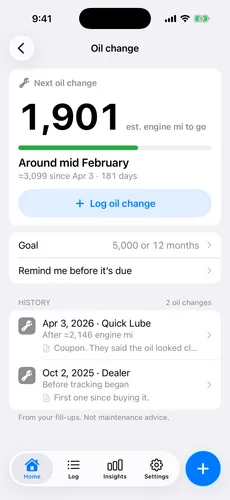
- Record the service. Keep its date and odometer reading, and save the service receipt with your vehicle records.
- Review your fuel history. Missing fill-ups or an unsuitable MPG assumption affect the engine-mile estimate.
- Set a tracking goal deliberately. The app’s engine-mile countdown measures progress toward your chosen goal. It does not enforce your manufacturer’s odometer-based schedule.
- Keep the calendar deadline visible. EngineMiles supports a time setting alongside the engine-mile goal. Pro adds notification reminders. Check the official mileage deadline separately.
If you are unsure which schedule or operating-condition notes apply, bring your model’s booklet and driving history to your service provider. The log helps you explain the usage; the official schedule remains the reference.